DayPilot
| Demo | |
|---|---|
| Downloads | |
| Repository | |
| Languages | TypeScript |
| Technologies | angular |
| Code License | Apache License 2.0 (Open-Source) |
Overview
-
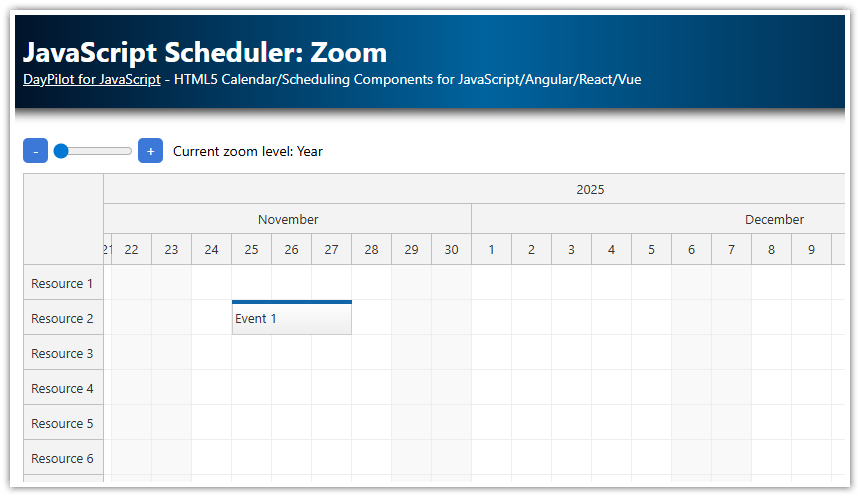
Define custom zoom levels for the Angular Scheduler component.
-
Switch the zoom level using an HTML5 range control and plus/minus buttons.
-
Includes the open-source DayPilot for JavaScript library (Lite edition, Apache License 2.0).
License
The source code of this tutorial and DayPilot Lite are licensed under Apache License 2.0. Please see the licensing information included in the sample project for details and third-party notices.
Scheduler Zoom Levels
The Angular Scheduler component from the DayPilot Lite package includes support for zoom. You can define custom zoom levels - each level sets predefined or calculated Scheduler properties. Typically, each level will set the scale, timeHeaders, startDate, and days properties.
The zoom levels need to be defined using the zoomLevels property of the Scheduler config object. In scheduler.component.ts, we keep the four definitions in a typed array:
zoomLevels: ZoomLevel[] = [
    {
      name: "Year",
      properties: {
        scale: "Day",
        cellWidth: 40,
        timeHeaders: [{groupBy: "Year"}, {groupBy: "Month", format: "MMMM"}, {groupBy: "Day", format: "d"}],
        startDate: (args: ZoomLevelCallbackArgs) => { return args.date.firstDayOfYear(); },
        days: (args: ZoomLevelCallbackArgs) => { return args.date.daysInYear(); },
      }
    },
    {
      name: "Month",
      properties: {
        scale: "CellDuration",
        cellDuration: 720,
        cellWidth: 40,
        timeHeaders: [{groupBy: "Month"}, {groupBy: "Day", format: "ddd d"}, {groupBy: "Cell", format: "tt"}],
        startDate: (args: ZoomLevelCallbackArgs) => { return args.date.firstDayOfMonth(); },
        days: (args: ZoomLevelCallbackArgs) => { return args.date.daysInMonth();},
      }
    },
    {
      name: "Week",
      properties: {
        scale: "Hour",
        cellWidth: 40,
        timeHeaders: [{groupBy: "Month"}, {groupBy: "Day", format: "dddd d"}, {groupBy: "Hour"}],
        startDate: (args: ZoomLevelCallbackArgs) => { return args.date.firstDayOfWeek(); },
        days: (_args: ZoomLevelCallbackArgs) => { return 7; },
      }
    },
    {
      name: "Hour",
      properties: {
        scale: "CellDuration",
        cellDuration: 15,
        cellWidth: 40,
        timeHeaders: [{groupBy: "Day", format: "dddd MMMM d, yyyy"}, {groupBy: "Hour"}, {groupBy: "Cell"}],
        startDate: (args: ZoomLevelCallbackArgs) => { return args.date.getDatePart(); },
        days: (_args: ZoomLevelCallbackArgs) => { return 1; },
      }
    },
  ];
It is an array of zoom level objects. The properties field specifies the Scheduler properties that will be applied when switching to this level. Other fields, such as name, are ignored by the zoom engine and can store custom data. Here we use name for the label beside the controls.
The property names correspond to the Scheduler properties. If a property value is a function, the function is executed and its result is assigned to the specified Scheduler property. The function receives a special args object:
-
args.date- the reference date calculated from the current Scheduler viewport. -
args.level- the new zoom level object (the parent item in thezoomLevelsarray).
The Year level uses daily cells; Month uses half-day cells; Week uses hourly cells; Hour shows one day in 15-minute cells. The callbacks align the timeline with the year, month, week or day containing the reference date. The sample sets zoomPosition: "left", so the left edge of the viewport determines that date. Zoom changes the displayed timeline, not the underlying event dates.
Switching the Zoom Level
The zoom level can be switched using the zoom property of the Scheduler config. The value is a zero-based array index: 1 selects Month. The Angular component stores its configuration in a signal and passes that signal to the Scheduler:
config = signal<DayPilot.SchedulerConfig>({
  startDate: "2026-11-01",
  zoom: 1,
  rowHeaderWidth: 120,
  zoomPosition: "left",
  zoomLevels: this.zoomLevels,
  // ...
});
<daypilot-scheduler [config]="config" [events]="events" #scheduler></daypilot-scheduler>
To change levels, call setZoom() with the new index. It clamps the value to the valid array range and replaces the configuration object using config.update(). This notifies the zoneless Angular application and the DayPilot wrapper; mutating a field of the existing signal value would not do that.
setZoom(value: number): void {
  const zoom = Math.max(0, Math.min(Number(value), this.zoomLevels.length - 1));
  this.config.update(config => ({ ...config, zoom }));
}
We use two controls to let users change the zoom level:
-
A range input control.
-
Plus/minus buttons.
HTML5 Range Control
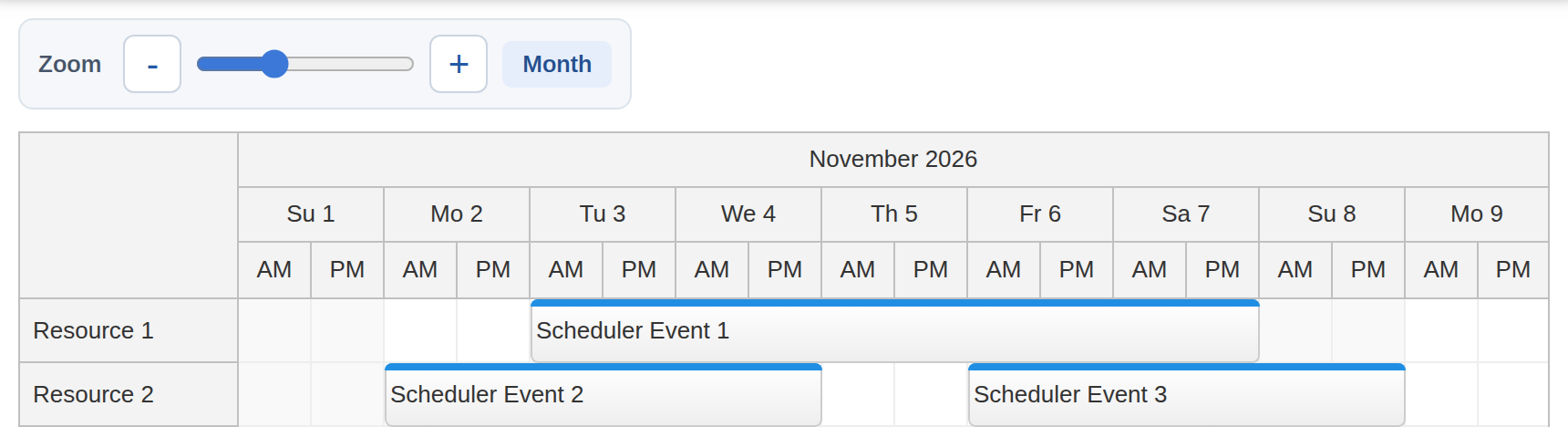
The range control reads config().zoom through [ngModel] and sends changes to setZoom() using (ngModelChange). Import FormsModule in the standalone component to enable these bindings. The maximum follows the array length, and step="1" keeps the slider on whole zoom-level indexes.
<input type="range" min="0" [max]="zoomLevels.length - 1" step="1"
       [ngModel]="config().zoom" (ngModelChange)="setZoom($event)" aria-label="Zoom level" />
The label uses the active index to display the corresponding level name:
get currentZoomLevelName(): string {
  return this.zoomLevels[Number(this.config().zoom)].name;
}
Plus/Minus Buttons

The plus and minus buttons increase or decrease the zoom index. Disable the minus button at the first level and the plus button at the last level to make the available direction clear:
<div class="controls" role="group" aria-label="Timeline zoom">
  <span class="controls-label">Zoom</span>
  <button id="minus" (click)="minus()" [disabled]="config().zoom === 0" aria-label="Zoom out">-</button>
  <!-- ... -->
  <button id="plus" (click)="plus()" [disabled]="config().zoom === zoomLevels.length - 1" aria-label="Zoom in">+</button>
  <!-- ... -->
</div>
Increasing or decreasing the value without checking it could select an index outside the zoomLevels array. Both handlers therefore use the same bounded setZoom() method as the slider. The signal update also keeps the slider position and label synchronized when a button is clicked.
plus(): void {
  this.setZoom(Number(this.config().zoom) + 1);
}

minus(): void {
  this.setZoom(Number(this.config().zoom) - 1);
}
Full Source Code
The complete SchedulerComponent is shown below. The sample uses four flat resource rows and starts in November 2026. Its in-memory DataService returns the whole event set so zooming to a different date range can display the same events. Selecting a time range opens a modal to create an event; created events remain in the Scheduler when switching levels. Changes are held in memory and are lost on a page reload.
import {Component, ViewChild, AfterViewInit, signal} from '@angular/core';
import {FormsModule} from '@angular/forms';
import {DayPilot, DayPilotModule, DayPilotSchedulerComponent} from '@daypilot/daypilot-lite-angular';
import {DataService} from './data.service';

@Component({
  selector: 'scheduler-component',
  standalone: true,
  imports: [DayPilotModule, FormsModule],
  providers: [DataService],
  template: `
    <div class="controls" role="group" aria-label="Timeline zoom">
      <span class="controls-label">Zoom</span>
      <button id="minus" (click)="minus()" [disabled]="config().zoom === 0" aria-label="Zoom out">-</button>
      <input type="range" min="0" [max]="zoomLevels.length - 1" step="1"
             [ngModel]="config().zoom" (ngModelChange)="setZoom($event)" aria-label="Zoom level" />
      <button id="plus" (click)="plus()" [disabled]="config().zoom === zoomLevels.length - 1" aria-label="Zoom in">+</button>
      <span id="label" aria-live="polite">{{currentZoomLevelName}}</span>
    </div>

    <daypilot-scheduler [config]="config" [events]="events" #scheduler></daypilot-scheduler>`,
  styles: [`
    .controls {
      display: inline-flex;
      align-items: center;
      gap: 8px;
      box-sizing: border-box;
      max-width: 100%;
      margin: 0 0 12px;
      padding: 8px 10px;
      border: 1px solid #dce3eb;
      border-radius: 8px;
      background: #f5f7fa;
    }
    .controls-label {
      margin-right: 4px;
      color: #475569;
      font-size: 13px;
      font-weight: 600;
    }
    .controls input[type=range] {
      width: 120px;
      min-width: 60px;
      margin: 0;
      accent-color: #3c78d8;
      cursor: pointer;
    }
    .controls button {
      display: inline-flex;
      align-items: center;
      justify-content: center;
      flex-shrink: 0;
      width: 32px;
      height: 32px;
      padding: 0;
      border: 1px solid #cbd5e1;
      border-radius: 6px;
      background: #ffffff;
      color: #2459a6;
      font-size: 20px;
      line-height: 1;
      cursor: pointer;
      transition: background-color 120ms, border-color 120ms;
    }
    .controls button:hover:not(:disabled) {
      border-color: #3c78d8;
      background: #e8f0fc;
    }
    .controls button:focus-visible,
    .controls input[type=range]:focus-visible {
      outline: 2px solid #3c78d8;
      outline-offset: 3px;
    }
    .controls button:disabled {
      border-color: #e2e8f0;
      background: #f1f5f9;
      color: #94a3b8;
      cursor: default;
    }
    #label {
      box-sizing: border-box;
      min-width: 60px;
      padding: 5px 10px;
      border-radius: 5px;
      background: #e6eefb;
      color: #234f8e;
      font-size: 13px;
      font-weight: 600;
      text-align: center;
    }
  `]
})
export class SchedulerComponent implements AfterViewInit {

  @ViewChild('scheduler')
  scheduler!: DayPilotSchedulerComponent;

  events = signal<DayPilot.EventData[]>([]);

  zoomLevels: ZoomLevel[] = [
      {
        name: "Year",
        properties: {
          scale: "Day",
          cellWidth: 40,
          timeHeaders: [{groupBy: "Year"}, {groupBy: "Month", format: "MMMM"}, {groupBy: "Day", format: "d"}],
          startDate: (args: ZoomLevelCallbackArgs) => { return args.date.firstDayOfYear(); },
          days: (args: ZoomLevelCallbackArgs) => { return args.date.daysInYear(); },
        }
      },
      {
        name: "Month",
        properties: {
          scale: "CellDuration",
          cellDuration: 720,
          cellWidth: 40,
          timeHeaders: [{groupBy: "Month"}, {groupBy: "Day", format: "ddd d"}, {groupBy: "Cell", format: "tt"}],
          startDate: (args: ZoomLevelCallbackArgs) => { return args.date.firstDayOfMonth(); },
          days: (args: ZoomLevelCallbackArgs) => { return args.date.daysInMonth();},
        }
      },
      {
        name: "Week",
        properties: {
          scale: "Hour",
          cellWidth: 40,
          timeHeaders: [{groupBy: "Month"}, {groupBy: "Day", format: "dddd d"}, {groupBy: "Hour"}],
          startDate: (args: ZoomLevelCallbackArgs) => { return args.date.firstDayOfWeek(); },
          days: (_args: ZoomLevelCallbackArgs) => { return 7; },
        }
      },
      {
        name: "Hour",
        properties: {
          scale: "CellDuration",
          cellDuration: 15,
          cellWidth: 40,
          timeHeaders: [{groupBy: "Day", format: "dddd MMMM d, yyyy"}, {groupBy: "Hour"}, {groupBy: "Cell"}],
          startDate: (args: ZoomLevelCallbackArgs) => { return args.date.getDatePart(); },
          days: (_args: ZoomLevelCallbackArgs) => { return 1; },
        }
      },
    ];

  config = signal<DayPilot.SchedulerConfig>({
    startDate: "2026-11-01",
    zoom: 1,
    rowHeaderWidth: 120,
    zoomPosition: "left",
    zoomLevels: this.zoomLevels,
    onTimeRangeSelected: async args => {
      const scheduler = args.control;
      const modal = await DayPilot.Modal.prompt("Create a new event:", "Event 1");
      scheduler.clearSelection();
      if (modal.canceled) {
        return;
      }
      scheduler.events.add({
        start: args.start,
        end: args.end,
        id: DayPilot.guid(),
        resource: args.resource,
        text: modal.result
      });
    }
  });

  constructor(private ds: DataService) {
  }

  setZoom(value: number): void {
    const zoom = Math.max(0, Math.min(Number(value), this.zoomLevels.length - 1));
    this.config.update(config => ({ ...config, zoom }));
  }

  plus(): void {
    this.setZoom(Number(this.config().zoom) + 1);
  }

  minus(): void {
    this.setZoom(Number(this.config().zoom) - 1);
  }

  get currentZoomLevelName(): string {
    return this.zoomLevels[Number(this.config().zoom)].name;
  }

  ngAfterViewInit(): void {
    this.ds.getResources().subscribe(resources => {
      this.config.update(config => ({ ...config, resources }));
    });

    const from = this.scheduler.control.visibleStart();
    const to = this.scheduler.control.visibleEnd();
    this.ds.getEvents(from, to).subscribe(events => this.events.set(events));
  }
}

export interface ZoomLevel extends DayPilot.ZoomLevel {
  name: string;
}

export interface ZoomLevelCallbackArgs {
  date: DayPilot.Date;
  level: DayPilot.ZoomLevel;
}
History
-
November 11, 2026: Angular 22, DayPilot Lite, signal-based configuration.
-
December 8, 2022: Angular 15, DayPilot Pro 2022.4.5475
-
December 15, 2020: Angular 11, DayPilot Pro 2020.4.4807, typed config object, array functions, cleanup
-
May 28, 2019: Initial release. Angular 7